开发者文档与贡献
🌐 Developer Docs & Contributing
本部分提供技术文档,供希望了解 Onlook 架构、为项目做出贡献或扩展其功能的开发者使用。
🌐 This section provides technical documentation for developers who want to understand Onlook's architecture, contribute to the project, or extend its functionality.
概览
🌐 Overview
Onlook 采用单一代码库(monorepo)结构,由多个互相连接的应用和包组成,主要使用 Next.js、React、TypeScript 和 Vite 构建。
🌐 Onlook is structured as a monorepo with several interconnected apps and packages, primarily built using Next.js, React, TypeScript, and Vite.
为 Onlook 做出贡献
🌐 Contributing to Onlook
我们欢迎为 Onlook 做出贡献!本指南将帮助你开始为该项目做贡献。
🌐 We welcome contributions to Onlook! This guide will help you get started with contributing to the project.
在向此仓库贡献之前,请先通过 issues、Discord、email 或其他任何方式与此仓库的所有者讨论你希望做的更改,然后再进行修改。
🌐 When contributing to this repository, please first discuss the change you wish to make via issues, Discord, email, or any other method with the owners of this repository before making a change.
请注意,我们有一份行为准则,请在与项目的所有互动中遵守它。
🌐 Please note we have a code of conduct, please follow it in all your interactions with the project.
在本地运行项目
🌐 Running the project locally
你可以按照这里的说明从源代码构建项目。
🌐 You can build the project from source using instructions here.
拉取请求流程
🌐 Pull Request Process
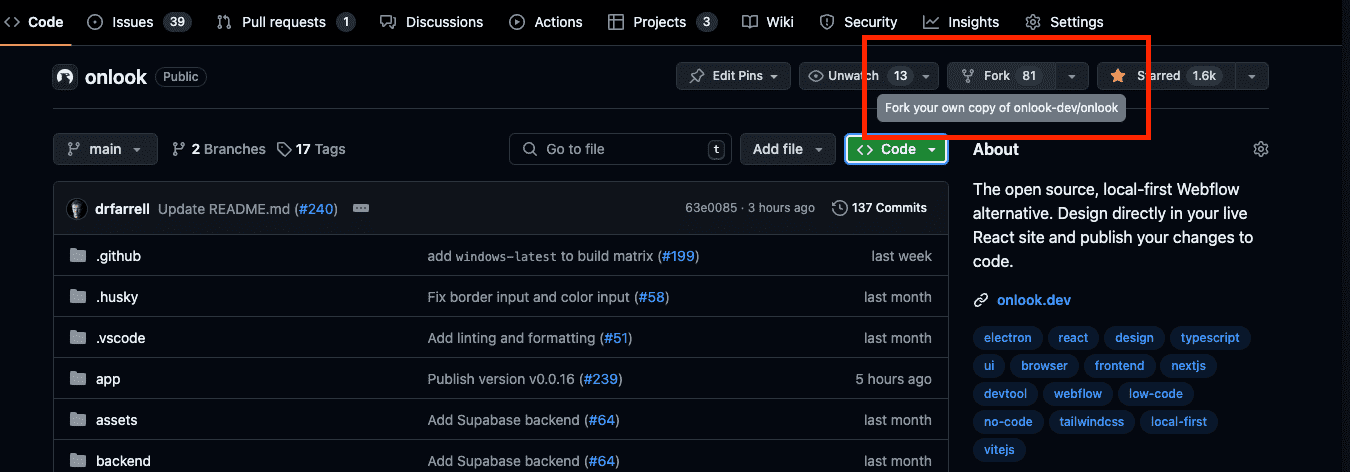
- 要创建拉取请求(PR),请创建项目的分叉。
- 在你的分支中创建更改,然后从该分支提交 PR
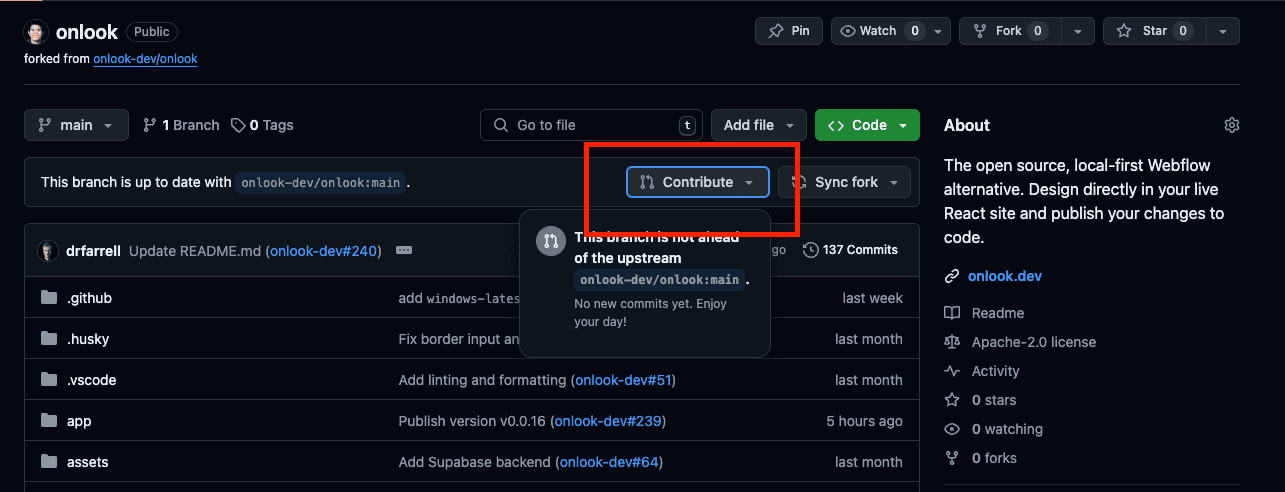
- 更新 PR 描述,详细说明更改内容。如有相关问题,请链接该问题。
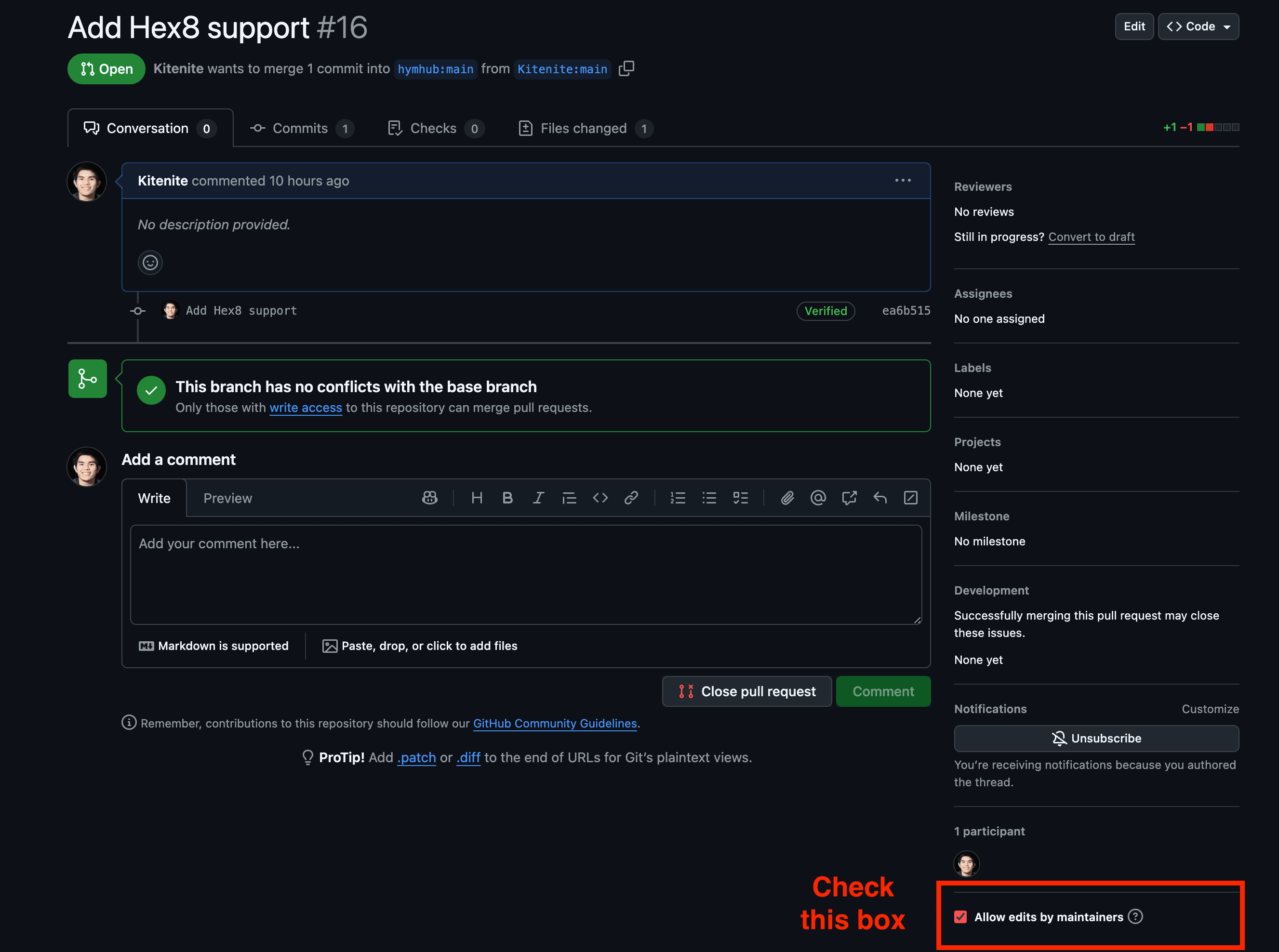
- 请务必勾选“允许维护者编辑”选项。这允许维护者在必要时更新你的 PR,从而加快审查流程。在这里查看更多。
- 请求一位维护者进行审核。一旦被接受,他们将能够合并你的拉取请求。
风格指南
🌐 Style guide
我们尝试遵循《代码整洁之道》(https://gist.github.com/wojteklu/73c6914cc446146b8b533c0988cf8d29) 的指南以及童子军原则:
🌐 We try to follow guidelines from Clean Code and the boy scoute rule:
“让代码比你找到时更整洁,而不是更乱。”
测试
🌐 Testing
我们使用 Bun 进行测试。
🌐 We use Bun for testing.
bun test代码风格检查
🌐 Linting
我们使用 ESLint 进行代码检查,使用 Prettier 进行格式化。这会在每次提交时运行。
🌐 We use ESLint for linting and Prettier for formatting. This runs on every commit.
bun lint
bun format
类型安全
🌐 Type safety
我们使用 TypeScript 来确保类型安全。
🌐 We use TypeScript for type safety.
要检查 Web 客户端的类型,请运行:
🌐 To check types of the web client, run:
cd apps/web/client && bun run typecheck