旁观架构
🌐 Onlook Architecture
Onlook 采用单一代码库(monorepo)结构,包含多个相互关联的应用和包,主要使用 Next.js、Supabase、TailwindCSS 和 Drizzle 构建。
🌐 Onlook is structured as a monorepo with several interconnected apps and packages, primarily built using Next.js, Supabase, TailwindCSS, and Drizzle.
https://www.youtube.com/embed/iaixwRNjg4I
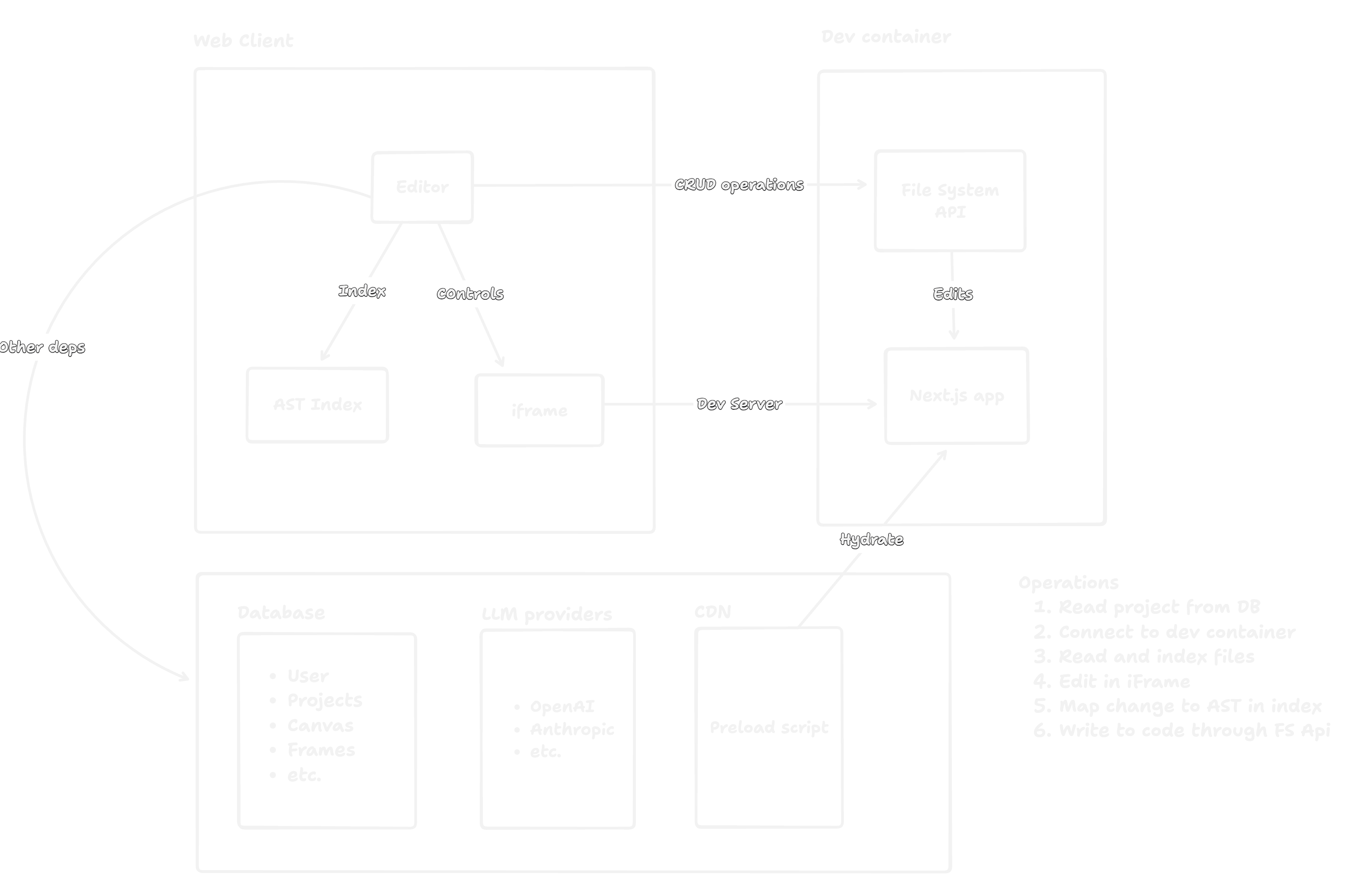
目录结构
🌐 Directory Structure
onlook/
|
├── apps/
│   ├── web/                       # Web application components
│   │   ├── client/                # Client-side application (Next.js)
│   │   ├── preload/               # Preload scripts (TypeScript)
│   │   └── server/                # Server-side code (Fastify.js - unused for now)
│   │
│   └── backend/                   # Backend (Supabase)
│
├── packages/
│   ├── models/                    # Shared data models and types
│   ├── ui/                        # Reusable UI components and theming (ShadCN + TailwindCSS)
│   ├── ai/                        # AI integration utilities (AI SDK)
│   └── schema/                    # Shared schema for the application (Drizzle ORM)
│
└── docs/                          # Documentation (Fumadocs + Nextjs)
高级概览
🌐 High-level overview
可视化编辑
🌐 Visual editing
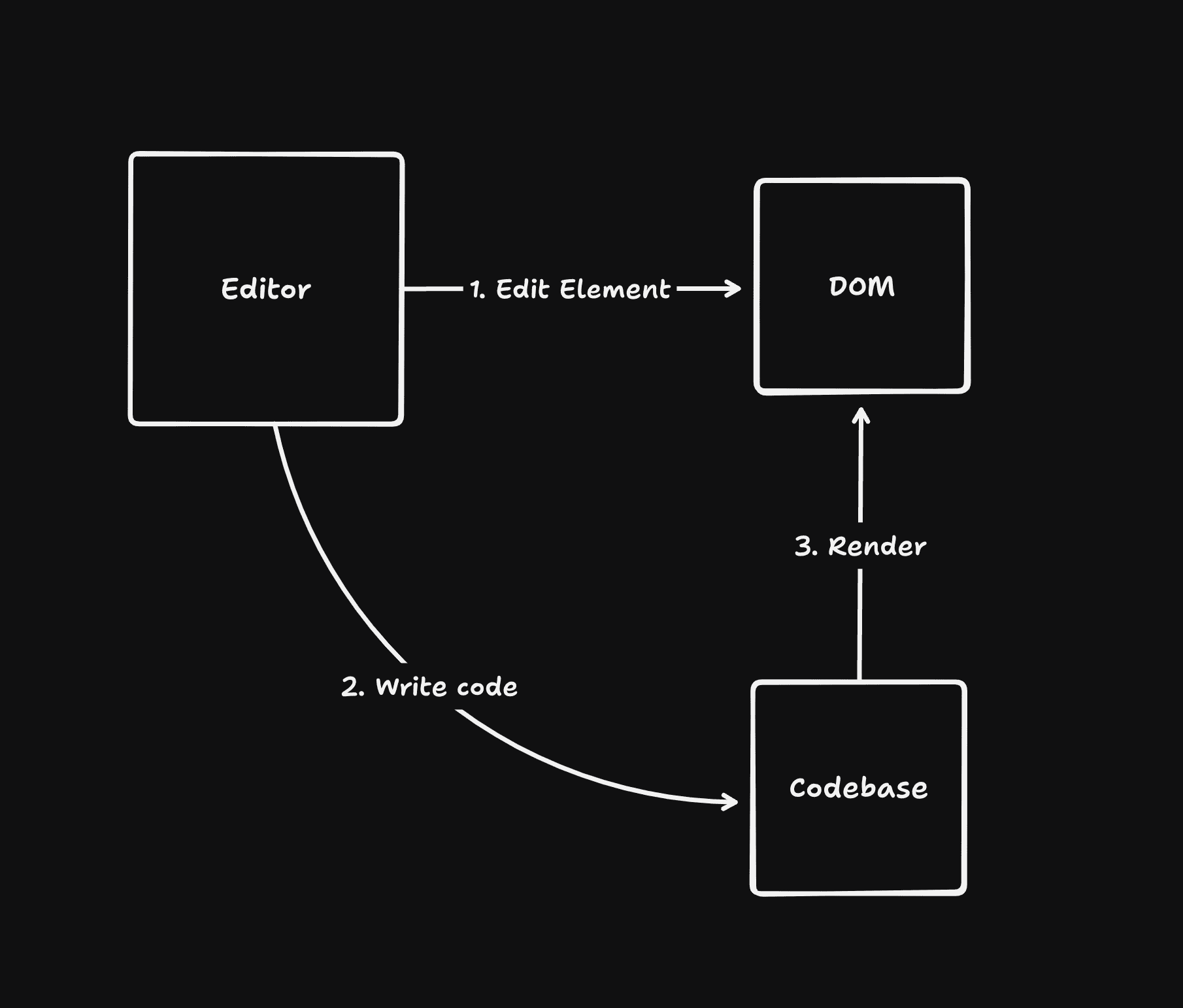
Onlook 技术上是一个浏览器,它指向运行该应用的本地主机。它可以像 Chrome 开发者工具一样操作 DOM,所有这些更改都是通过 CSS 样式表或 DOM 操作注入到页面中的。这些更改是非持久性的,直到被写入代码为止。
🌐 Onlook is technically a browser that points to your localhost running the app. It can manipulate the DOM like a Chrome Devtool, and all these changes are injected into the page through a CSS stylesheet or DOM manipulation. The changes are non-persistent until written to code.
写代码
🌐 Write to code
为了将更改翻译到代码中,我们在构建时向 DOM 元素注入一个属性,该属性像源映射一样指回代码。该属性为我们提供代码块的位置和组件的作用域。然后我们找到代码,将其解析为 AST,注入样式,然后再写回去。
🌐 To translate the changes to code, we inject an attribute into the DOM elements at build-time that points back to the code like a sourcemap. The attribute gives us the location of the code block, and the component scope. We then find the code, parse it into an AST, inject the styles, then write it back.
框架支持
🌐 Framework support
这种技术与框架无关,因为我们可以为另一个框架更换不同的编译器。它可以适用于任何代码库,因为我们仅使用不需要任何自定义代码的开放标准。生成的代码直接写入你的代码库,本地保存,因此你可以随时获取输出,而不会被工具锁定。
🌐 This technique is framework agnostic as we can swap in a different compiler for another framework. It can work for any codebase as we’re just using open standards that don’t require any custom code. The code generated is written directly into your codebase, locally, so you can always take the output without being locked-in to the tool.
操作
🌐 Actions
所有的更改都会以操作的形式存储。这使得它们可以被序列化、存储并重现。我们之所以这样做,是为了将来能够引入在线协作或让智能代理生成操作。为此,我们只需要提供本地运行的页面并处理传入的操作即可。
🌐 All the changes made are stored as actions. This allows them to be serialized, stored, and reproduced. We did it this way so eventually, we can introduce online collaboration or let an agent generate actions. To do this, we’d just need to serve the locally running page and resolve incoming actions.
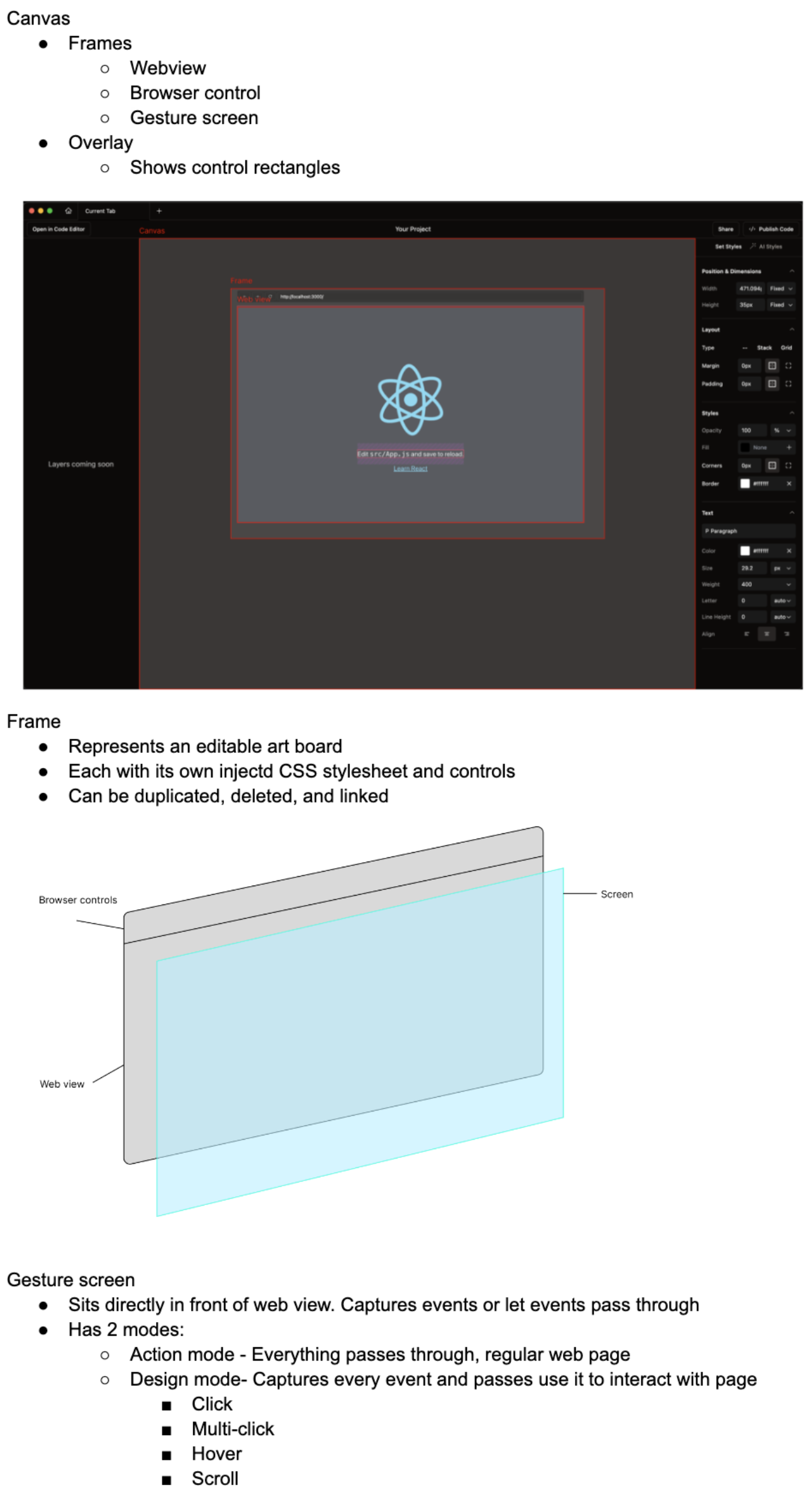
画布的工作原理
🌐 How the canvas works
编辑的工作原理
🌐 How edits work
DOM之间的编辑是如何发生的,以及如何写入代码
🌐 How edits happen between the DOM, and writing to code
演示视频:https://youtu.be/aGUD9xS1XvA
🌐 Walkthrough video: https://youtu.be/aGUD9xS1XvA
时间戳:
🌐 Timestamps:
参考文献
🌐 References
旧的 Electron 架构文档。仍然适用,用 iframe 替换 webview:https://github.com/onlook-dev/desktop/wiki/Architecture
🌐 Old electron architecture doc. Still relevant, replace webview with iframe: https://github.com/onlook-dev/desktop/wiki/Architecture